Lite 可通过文本或一张首帧图生成 1–15 秒视频。480P 或 720P 每秒 0.5 quota 起,1080P 由 720P 放大。
先确定你需要的镜头
Lite 支持生成 1 至 15 秒视频,输入可以是文本或一张首帧图,输出有 480P、720P 和放大的 1080P。先写清场景、主要动作和运镜。
模型详情有九段来源明确的案例,例如实验室、铸造车间片头、水下机器人、商品机构、抹茶制作、狐狸及户外场景。
设置时长、首帧和分辨率
用 POST /grok/generations 和模型 ID grok-imagine-video-1.5-lite。文生视频传 prompt、字符串 video_length 和 resolution_name。支持 2:3、3:2、1:1、9:16、16:9,可先发一条 720P 纯文本请求。
首帧生成用 first_frame 传一张图像 URL,提示词写清后续动作。Lite 支持的两种生成方式是文生视频和首帧图生视频。
| 字段 | 取值或行为 |
|---|---|
| model | grok-imagine-video-1.5-lite |
| video_length | 字符串,1 至 15 秒 |
| resolution_name | 480p、720p 或放大至 1080p |
| first_frame | 首帧图生视频使用一张图像的 URL |
文生视频示例:绿藻实验室
Runware 的 8 秒竖屏片从冒泡的藻类培养物拍起,镜头穿过实验室,移向取样技术员。提示词同时指定运镜、焦点变化、人物动作和环境声。
写同类提示词时,明确镜头内哪些事会发生变化,一个可检验的动作比一串形容词更容易评估。
An eight-second portrait documentary shot moves from bubbling emerald algae tubes to a technician collecting a culture sample. Pull back and arc smoothly around the glass reactors, then focus on the vial. Realistic fluid motion, cool laboratory lighting, pump hum, bubbles, and no speech or music.
首帧示例:深海电缆预告
用已有的水下机器人和电缆图像开场,提示词让镜头慢慢接近,加入漂浮沉积物、青色脉冲灯与标题。Runware 同时公开首帧和 6 秒成片,可对照构图与动作。
保留首帧已经交代的构图,重点写接下来如何运动。模型页也有机械接头和秋林狐狸的原始首帧及完整的九段示例。
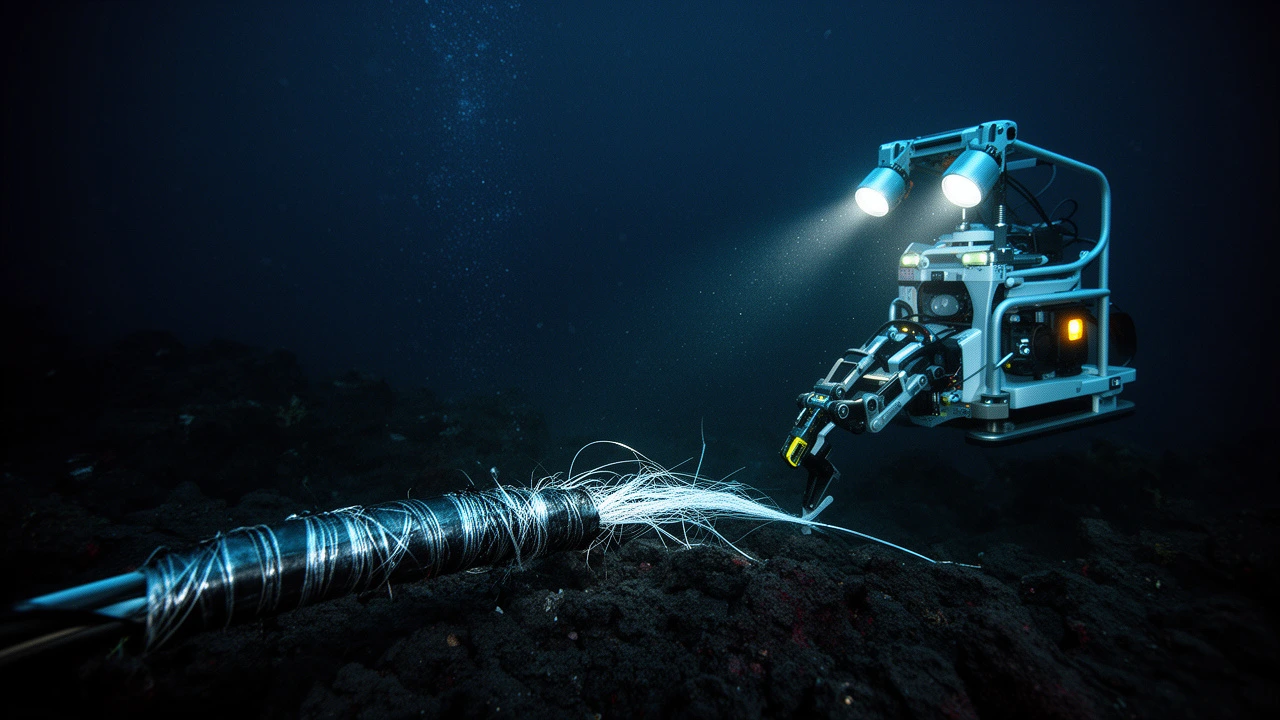
A six-second deep-sea shot follows an ROV approaching a severed cable. Sediment drifts through its lights; a cyan pulse travels through exposed fibers before the lamps go dark and reveal DARK FIBER. Restrained cinematic movement, sonar ping, thruster hum, and a final bass impact.
curl --request POST \
  --url 'https://api.ttapi.io/grok/generations' \
  --header "TT-API-KEY: $TTAPI_KEY" \
  --header 'Content-Type: application/json' \
  --data '{
  "model": "grok-imagine-video-1.5-lite",
  "prompt": "A six-second deep-sea shot follows an ROV approaching a severed cable. Sediment drifts through its lights; a cyan pulse travels through exposed fibers before the lamps go dark and reveal DARK FIBER. Restrained cinematic movement, sonar ping, thruster hum, and a final bass impact.",
  "aspect_ratio": "16:9",
  "video_length": "6",
  "resolution_name": "720p",
  "first_frame": "https://web-static-cdn.ttapi.io/20261013100159-39ac48a9.webp"
}'按输出分辨率计算价格
非官方 Lite 的 480P、720P 为每秒 0.5 quota(约 $0.005),放大 1080P 为每秒 2 quota(约 $0.02),适用 1–15 秒。
低分辨率档位为标准 1.5 费率的四分之一,1080P 为一半。Fast 按片段时长分档。预算时用每秒费率乘以时长,并另计重试和废片。
| 模型 | 分辨率 | 费率 | 单位 |
|---|---|---|---|
| Grok 1.5 Lite | 480P / 720P | 0.5 quota · $0.005 | / 秒 |
| Grok 1.5 Lite | 1080P(放大) | 2 quota · $0.02 | / 秒 |
| Grok 1.5 | 480P / 720P | 2 quota | / 秒 |
| Grok 1.5 | 1080P | 4 quota | / 秒 |
表中为非官方渠道价格。官方渠道另有价格规则,请确认请求使用的渠道和最终扣除的 quota。
提交 Lite 生成请求
示例通过 TT-API-KEY 和 JSON 提交 10 秒 720P 任务。替换成自己的提示词,将密钥留在服务端。提交返回 jobId,成品需后续查询。
建议先用一个主体、一个运镜和明确的验收条件验证。检查时长、构图、画面稳定性和瑕疵后,再加入 first_frame 测试。
curl --request POST \
  --url 'https://api.ttapi.io/grok/generations' \
  --header "TT-API-KEY: $TTAPI_KEY" \
  --header 'Content-Type: application/json' \
  --data '{
  "model": "grok-imagine-video-1.5-lite",
  "prompt": "A slow camera orbit around a ceramic cup on a sunlit desk, soft shadows, steady motion, no text.",
  "aspect_ratio": "16:9",
  "video_length": "10",
  "resolution_name": "720p"
}'查询原任务并保存视频
保存 jobId,用 Grok Fetch 查询状态和结果,也可以使用 hook_url 接收完成或失败通知。轮询和回调应更新同一任务,避免重复事件导致再次提交。
记录模型、时长、分辨率、quota 和输出网址。区分生成失败、输出不完整及成品不合格。确认链接可打开且视频符合需求后,再标记完成。
curl --request GET \
  --url "https://api.ttapi.io/grok/fetch?jobId=$JOB_ID" \
  --header "TT-API-KEY: $TTAPI_KEY"