Grok Imagine Video 1.5 Lite on TTAPI generates 1–15 second clips from text or a first-frame image. Use the nine provider examples to explore documentary scenes, products, wildlife, and social clips, then choose text-only or first-frame input for your own brief. Pricing starts at 0.5 quota per second for 480P/720P; 1080P is upscaled from 720P.
Start with the clip you need
The Grok Imagine Video 1.5 Lite API on TTAPI creates clips from 1 to 15 seconds using text-to-video or a single first-frame image, with 480P, 720P, and upscaled 1080P output. Start with one scene, one main action, and the camera move that makes the clip useful.
The model detail page contains nine sourced examples, including laboratory footage, a foundry title reveal, an underwater ROV, a product mechanism, matcha preparation, a fox, and three cinematic outdoor scenes. Compare motion and framing in those examples, then test your own brief under the same settings.
Duration, first frame, and resolution settings
Use the exact model ID grok-imagine-video-1.5-lite with POST /grok/generations. A text-to-video request uses prompt, video_length as a string, and resolution_name. Supported aspect ratios are 2:3, 3:2, 1:1, 9:16, and 16:9. Start with a prompt-only 720P request to confirm your request handling.
For first-frame generation, supply one opening-image URL in first_frame and describe the motion that follows. Lite's two supported generation workflows are text-to-video and first-frame-to-video.
| Field | Value or behavior |
|---|---|
| model | grok-imagine-video-1.5-lite |
| video_length | String from 1 to 15 seconds |
| resolution_name | 480p, 720p, or 1080p (upscaled) |
| first_frame | One opening-image URL for first-frame-to-video |
Text to video: emerald algae laboratory
Runware's eight-second portrait example starts close to bubbling algae cultures, then moves through the laboratory toward a technician collecting a sample. The camera path, focus change, subject action, and ambient sound are described together in the source request.
For a similar prompt-only brief, name what changes during the shot. A moving camera and one clear action provide a more reviewable test than a list of visual adjectives. The player below shows the published Lite output, with a shortened prompt for reference.
An eight-second portrait documentary shot moves from bubbling emerald algae tubes to a technician collecting a culture sample. Pull back and arc smoothly around the glass reactors, then focus on the vial. Realistic fluid motion, cool laboratory lighting, pump hum, bubbles, and no speech or music.
Starting frame: deep-sea cable teaser
The underwater example pairs an existing ROV-and-cable image with instructions for a slow approach, drifting sediment, a cyan pulse, and a title reveal. Runware published the starting image alongside the six-second Lite output, so you can inspect both composition and motion.
When using a first frame, keep the supplied composition and describe the action that follows it. The detail page also includes a mechanical coupling and an autumn fox with their original starting images. All nine clips are available in the same poster-based waterfall gallery.
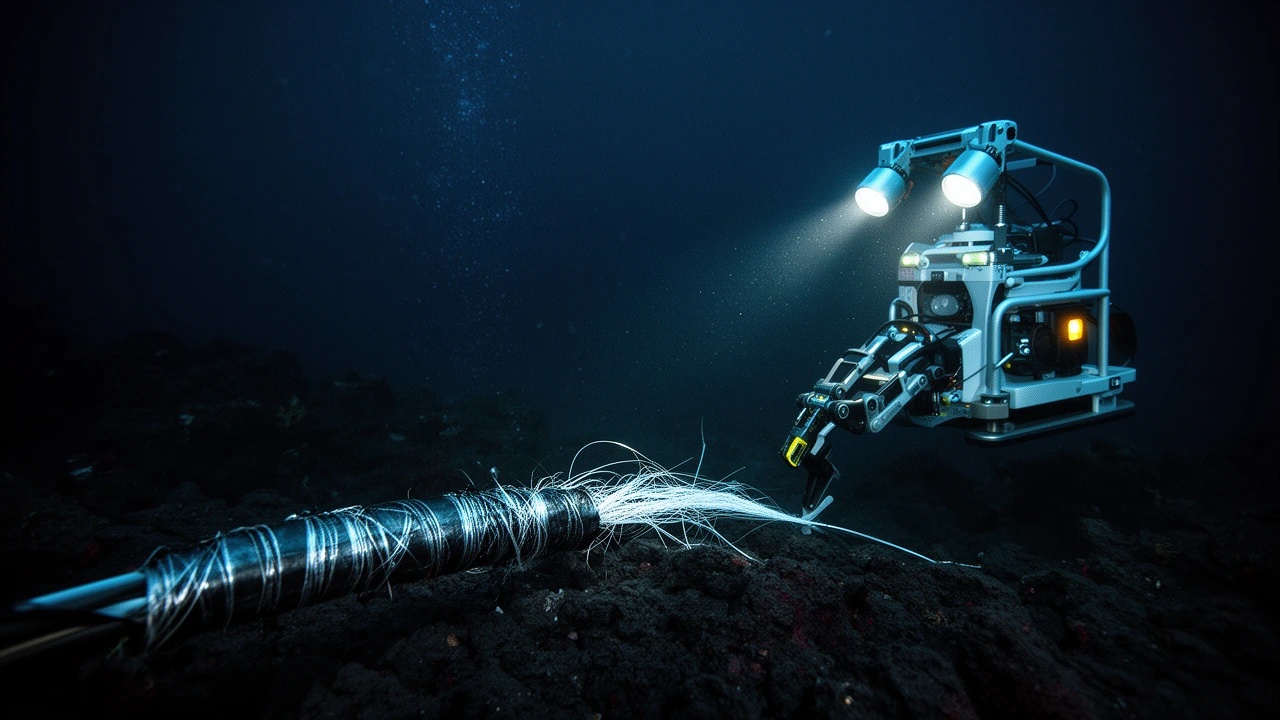
A six-second deep-sea shot follows an ROV approaching a severed cable. Sediment drifts through its lights; a cyan pulse travels through exposed fibers before the lamps go dark and reveal DARK FIBER. Restrained cinematic movement, sonar ping, thruster hum, and a final bass impact.
curl --request POST \
  --url 'https://api.ttapi.io/grok/generations' \
  --header "TT-API-KEY: $TTAPI_KEY" \
  --header 'Content-Type: application/json' \
  --data '{
  "model": "grok-imagine-video-1.5-lite",
  "prompt": "A six-second deep-sea shot follows an ROV approaching a severed cable. Sediment drifts through its lights; a cyan pulse travels through exposed fibers before the lamps go dark and reveal DARK FIBER. Restrained cinematic movement, sonar ping, thruster hum, and a final bass impact.",
  "aspect_ratio": "16:9",
  "video_length": "6",
  "resolution_name": "720p",
  "first_frame": "https://web-static-cdn.ttapi.io/20261013100159-39ac48a9.webp"
}'Grok Video 1.5 Lite pricing by resolution
The non-official Lite rate is 0.5 quota · $0.005 per second at 480P or 720P, and 2 quota · $0.02 per second for upscaled 1080P. Both tiers apply to the documented 1–15 second duration range. The prices in the table below come from the same model data used on TTAPI's detail and pricing pages.
At 480P/720P, Lite's listed rate is one quarter of standard 1.5's rate; at 1080P it is half. Fast uses clip-duration tiers rather than the same per-second schedule. For a budget, multiply the selected rate by clip length, then track retries and rejected outputs separately. A lower submission price only reduces the cost of a usable clip when the output meets your acceptance checks.
| Model | Resolution | Rate | Unit |
|---|---|---|---|
| Grok 1.5 Lite | 480P / 720P | 0.5 quota · $0.005 | / second |
| Grok 1.5 Lite | 1080P (upscaled) | 2 quota · $0.02 | / second |
| Grok 1.5 | 480P / 720P | 2 quota | / second |
| Grok 1.5 | 1080P | 4 quota | / second |
These are non-official channel rates. Official-channel prices use a different schedule; confirm the channel and final billed quota for your request.
Submit a Lite video generation request
The example below sends a 10-second 720P clip request with TT-API-KEY and a JSON body. Replace the scene prompt with your brief and keep the API key on your server. The submission returns a jobId rather than a finished video file. This is a documented request template, not a recorded generation result.
A useful first test has one subject, one camera move, and a clear acceptance condition. Check the completed clip for temporal stability, the requested duration, framing, and visible artifacts. Once a prompt-only request works, add a single first_frame image to test the first-frame workflow under the same settings.
curl --request POST \
  --url 'https://api.ttapi.io/grok/generations' \
  --header "TT-API-KEY: $TTAPI_KEY" \
  --header 'Content-Type: application/json' \
  --data '{
  "model": "grok-imagine-video-1.5-lite",
  "prompt": "A slow camera orbit around a ceramic cup on a sunlit desk, soft shadows, steady motion, no text.",
  "aspect_ratio": "16:9",
  "video_length": "10",
  "resolution_name": "720p"
}'Retrieve the asynchronous video result
Save the returned jobId and use TTAPI's Grok Fetch route to read the task status and completed result. A hook_url can notify your application when the task completes or fails. Polling and callbacks should update the same job record so that a repeated event does not create a second submission.
Record the submitted model ID, duration, resolution, returned quota, and output URL. Treat generation failure, incomplete output, and an unusable result as separate outcomes in your evaluation. Verify that the returned video URL opens and that the clip matches the scene brief before marking the job complete.
curl --request GET \
  --url "https://api.ttapi.io/grok/fetch?jobId=$JOB_ID" \
--header "TT-API-KEY: $TTAPI_KEY"Open the Grok Imagine Video 1.5 Lite API.
Continue from the model page to review the model ID, request example, and current pricing.