Flare is the starting point for fast creative iteration; Sunburst is the starting point for demanding detail and precise edits. Both generate and edit images. Choose around the work that matters most: exploring more directions, or preserving more of the details in a finished composition.
One image family, two creative priorities
GPT Image 2.6 is OpenAI's image generation and editing family, offered on TTAPI as Flare and Sunburst. Both can turn a description into a new image or help revise an existing one. Their distinction is the creative workflow they are positioned to serve: Flare emphasizes speed, while Sunburst emphasizes detailed visual work and edit precision.
The 2.6 release focuses on making visual production more iterative: producing polished imagery sooner, then refining it while retaining recognizable characters, products, and brand details. That makes the family relevant to campaign development, product imagery, illustration, information design, and repeated editing rounds.
Transparent artwork and GIF output extend the family to reusable product assets, stickers, mascots, and lightweight motion. For these jobs, the choice involves both the look of an image and how easily the finished asset fits into a larger creative project.
The choice is more useful when framed as a production question. Do you need to explore several good directions quickly, or does the image need to satisfy a dense set of visual constraints before it can be used?
Flare vs Sunburst at a glance
Flare is worth trying first when turnaround time is central to the job. Sunburst is worth trying first when the brief is difficult because of its detail, layout, or preservation requirements. These are starting points from OpenAI's positioning, rather than boundaries on the kinds of images either model can make.
GPT Image 2.6 Flare
gpt-image-2.6-flareA practical first choice when a fast feedback loop matters.
- Explore campaign directions and visual concepts
- Build poster and product-image variations
- Refine a brief through shorter review cycles
GPT Image 2.6 Sunburst
gpt-image-2.6-sunburstA practical first choice when small details determine whether the result is usable.
- Work on detailed compositions and information design
- Inspect small labels, materials, and product geometry
- Prioritize consistency through demanding edits
Flare can produce polished finished artwork, and Sunburst can be used for exploration. Choose by the constraints of the brief rather than treating one as only a draft model and the other as only a final-image model.
| Creative priority | Flare | Sunburst |
|---|---|---|
| Many concepts to review | Start here when iteration pace leads | Test when the concepts are unusually demanding |
| Detailed layouts and labels | Try when the brief already meets your quality bar | Start here when precision is central |
| Repeated edits | Assess whether key details stay consistent | Prioritize when preservation is especially demanding |
| Image generation and editing | Both supported | Both supported |
| TTAPI official-channel discount | 20% off official | 20% off official |
Flare: creative direction with a quick feedback loop
Consider a team developing a food-market campaign. It may need an illustrated map, menu concepts, social graphics, and different photographic directions before choosing a final style. Flare's speed-oriented positioning makes it a useful starting point for that kind of exploration: the team can review an idea, tighten the brief, and see the next direction.
The published Flare example below combines an illustrated setting with a title, numbered stalls, and a legend. It illustrates a more structured creative task than a decorative scene. The useful questions are whether the labels remain readable, the numbering makes sense, and the composition works at the size where people will see it.
For posters and product imagery, evaluate the overall design as well as the hero subject. An attractive product can still be unsuitable if its headline competes with it or the layout leaves no room for required copy.
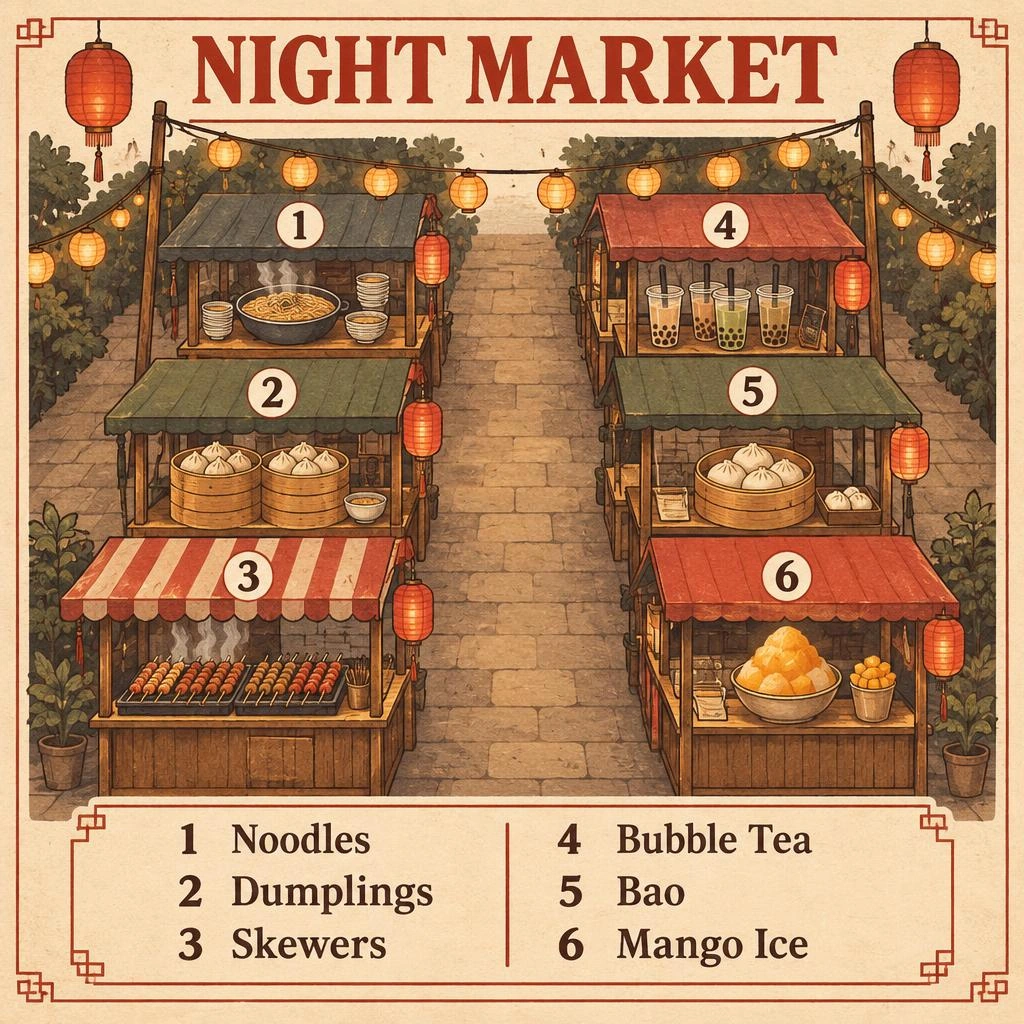
Illustrated map poster of a night market on cream paper, titled exactly "NIGHT MARKET", six numbered stalls drawn along two aisles, with a legend reading exactly "1 Noodles", "2 Dumplings", "3 Skewers", "4 Bubble Tea", "5 Bao", "6 Mango Ice". Clean editorial design, muted earth tones with one chili red accent, subtle paper texture, sharp legible type, no other words or logos.
Sunburst: detail, structure, and careful refinement
A product cutaway or technical illustration places a different burden on the image. The subject needs to remain recognizable while many smaller elements, labels, and spatial relationships work together. OpenAI positions Sunburst for this kind of detailed visual work and for more precise edits.
Made's turntable example separates the product into labeled components. Look at material texture, the separation between parts, the routing of leader lines, and the readability of the lettering. The image shows a useful creative direction for explanatory artwork; technical accuracy still needs review against a reliable reference.
Sunburst is also a sensible starting point when a product or character must survive several revisions. Check whether identity, geometry, colors, and surrounding details remain usable as the requested changes accumulate. A strong first image is only part of that workflow.
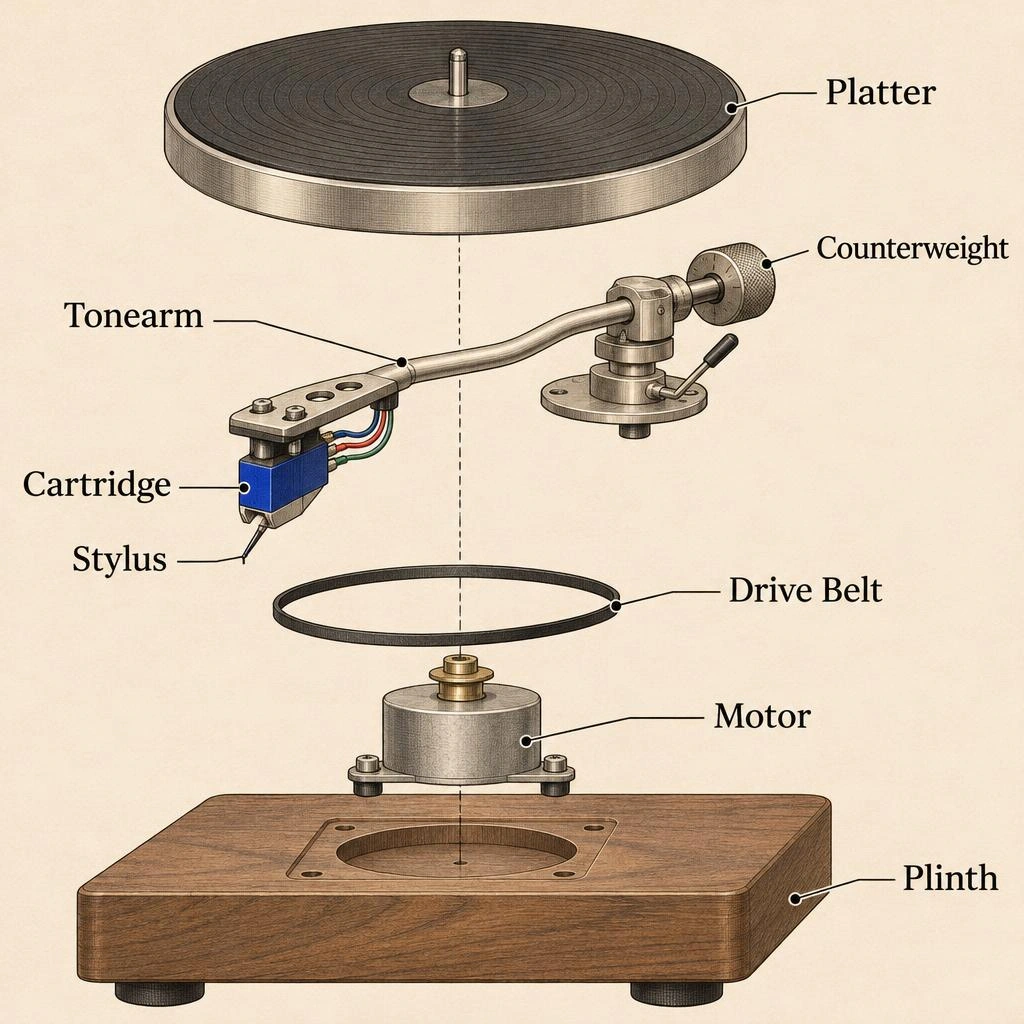
Exploded technical illustration of a turntable on off-white paper, its parts floating apart along one axis with thin leader lines and labels reading exactly "Platter", "Tonearm", "Cartridge", "Stylus", "Counterweight", "Drive Belt", "Motor", "Plinth". Clean editorial design, fine ink linework, muted earth tones with one cobalt accent, sharp legible type, no other words or logos.
Which model fits your next project?
For social campaigns and early advertising concepts, start with Flare when the goal is to compare several directions and keep creative review moving. For a final asset with dense copy, many visual elements, or a strict brand brief, start with Sunburst and judge the details that could prevent publication.
For e-commerce, separate lifestyle exploration from product fidelity. Flare can be the first test for new settings and compositions; Sunburst can be the first test for demanding material, geometry, or editing constraints. Neither choice removes the need to inspect the product, label text, and any details customers rely on.
For illustration and character work, try both when the visual style itself is still open. A model's positioning does not determine which interpretation you will prefer. Once a direction is selected, compare how well it holds together across the rest of the series.
Compare finished usefulness, not just a striking first image
Use the same brief and references when you want to make a direct comparison. The two published examples in this article use different briefs, so they show possible applications rather than proving a winner. Your own campaign, catalog, or illustration series is a better basis for choosing a default.
Review more than one output and include a difficult revision. A faster first response may be less valuable if the result needs repeated corrections; a more detailed image may add little if the simpler version already meets the brief. The meaningful comparison is how readily each model gets your team to an accepted asset.
- Composition: subject placement, hierarchy, and room for required copy
- Text: spelling, readability, and the placement of labels
- Fidelity: recognizable identity, product shape, materials, and colors
- Editing: whether the intended change preserves the details around it
Choosing Flare or Sunburst on TTAPI
Both models use the same official-channel discount on TTAPI: 20% off official pricing. There is no special extra discount for either 2.6 variant. Choose the model that fits the visual task, then compare the cost and review effort involved in getting an image you can actually use.
Start with Flare for a fast creative loop, or Sunburst for a demanding detail or editing brief. The model pages collect their examples, supported controls, and current integration details when you are ready to try them.
Open the model that matches the job.
Compare the model pages, then follow the current image API documentation.